Friday, December 12, 2014

Fine little article. TL; DR: Perks are fine, but what matters is flexibility and connection to a shared purpose


I ran across this little article today that seemed relevant.

MSIS put quite a bit of resources into the B200 collaboration space for the environment that enables teamwork, but there is something to be said for taking flexibility to the next logical step. Telework, co-work , and scheduling options should get some love. Additionally, we should be working in a more concentrated, meaningful way at ensuring our individual teams have the access and opportunity to be part of a shared vision. Not necessarily on some grand scale, but individually with the teams and their directors. We have the big MSIS vision documented, but perhaps that needs to be rooted a touch more.

FWIW: http://techcrunch.com/2014/12/11/perks-dont-work/

Wednesday, December 10, 2014

Mashable's Setting Up Shop Series


This is a neat series from Mashable on how a small business owners is getting going. There are some tidbits in these I believe pertinent to MSIS work but certainly not everything. If nothing else, I know there are several out there with the entrepreneurial spirit and might not have run across these yet. Worth a look-see IMO.

http://mashable.com/category/setting-up-shop/

Friday, November 14, 2014

How I Work: Managing Projects from the Moon

It might as well be the moon, anyway! I’ve worked for MSIS on the other side of the Earth, nearly 8000 miles away from Ann Arbor, for just shy of seven years now. My day is your night, so we work almost completely opposite schedules, and I have only four overlap hours each week where we could have real-time exchanges. Like many of you, however, managing projects is one aspect of my job, and - in the spirit of teaching and learning from each other - I thought I’d give you a flavor for how I approach it. Some of this has been influenced by me being a teleworker, but most of it is just my own personal style, and I’m hoping you find all of it applicable to you. If you think I should be doing something differently, though, or if you want to ask me a question about my approach, please leave a comment below and we’ll stir up some conversation.


Manage a Team of One

Before I define work for others, I need to be able to define it for myself...


  1. Self-start, understand what I need to achieve, set my own goals, and see them to completion. Don’t wait for someone else to spoon-feed me.
  2. Spend some time planning each Monday so that the week is filled with meaningful activities. Sketch out more project stories than I think I can handle just in case I surprise myself (the same goes for any stories I sketch for others). If I have ticket work, know which ones I need to stay on top of. Prep some career development tasks to move forward on in the event that I find myself with a free moment without story or ticket work.
  3. If I ever find myself procrastinating, bored, or hiding from particular work, I’ll talk to my Product Owner and/or supervisor about it. It could be a sign that the work isn’t actually worth doing or it isn’t yet defined well enough.


Spice Up Inception

When I start a project and whip up an Inception Deck, I tend to make these enhancements...


  1. Help bring my project to life by including extra slides of prototype logos, potential product names, or imaginary ads.
  2. Put images of people’s faces, not their names, on the stakeholder map. It personalizes the map, allows me to arrange the stakeholders on it more quickly, and helps me remember who’s on it.
  3. When I reach the end of the deck, before I pick a t-shirt size, I write story candidates for the entire project. I make the stories as small (fewer points) and discrete (fewer key results / acceptance criteria) as I can, group them into iterations, then tally the iteration story points. I end up with a better t-shirt size estimate and I’m able to use those stories to get my project rolling as soon as it is cleared for takeoff. (I don’t stick rigidly to them, though - projects need to adapt as work unfolds - so I evaluate story candidates each week and add, modify, or delete as necessary.)
  4. If the project feels too big, I add a slide to propose ways of breaking it up.


Stay in Touch

As my project marches onward, I keep connected to involved and interested people...


  1. Find my audience at the beginning of the project by writing to customers and staff about what I’m doing and seeing who’s interested.
  2. Mine my audience for feedback with interviews and surveys, then share the results with them so they know their input mattered.
  3. When I need to get the word out about something, like a product I’ve launched or a survey I want people to participate in, I use a diverse array of media outlets: printed posters, digital signs, MSIS website carousel images, and newsletters like NCRC Community News and Announcements. Michael Warden, Susan Topol, and the MSIS Communications Committee are all great resources for ideas on this.
  4. Update my Product Owner every day with a brief list of the project team’s progress on current stories. That gives them a sense the project’s momentum, allows them to make quick course corrections, and lets them give accurate status updates to anyone who asks. I do this through an Asana task that my Product Owner follows, but an email would do just fine.
  5. Provide weekly progress updates to my “engage closely” stakeholders. I like to do this with a light presentation - just 3 or 4 slides - that covers what we completed in the week and what’s next on the horizon.
  6. Ask my “keep informed” and “check with periodically” stakeholders how frequently they would like to receive progress updates (at weekly, every-other-week, or monthly intervals) and provide those updates accordingly (also through a light presentation).
  7. Whenever a project artifact is drafted (design document, policy, process, learning materials, etc), or new piece of technology implemented, I invite my whole project team to review it and provide feedback.
  8. Involve all the members of my project team in my weekly planning. Make sure they are available to work on the stories I assign and make sure they have a chance to influence them.
  9. If I need to talk to someone in-person, but I’m pressed for time or separated from them physically, I ask someone to be my legs. I could ask fellow teammate Monica, for example, to help me ask a question at a morning stand-up.
  10. Look for people who are involved in similar initiatives around campus or more broadly in the industry, then reach out to them for a fresh perspective, to learn from their experience, or to find new avenues of collaboration. Procurement has helped me do this, for example, by recommending people to talk to based on RFI/RFQ/RFP submissions and responses.
  11. What I don’t often do are project meetings, be they in-person or via teleconference. I believe they often produce less value than the time they consume, so I use them sparingly and only when I feel there is no adequate alternative.


Make Myself Laugh

I consciously look for opportunities to inject fun and humor into my project wherever I can. It helps me stay motivated, leads to increased creativity in my work, and hopefully sparks interest in others. For example…


  1. I build my inception deck and stakeholder updates around a theme and sprinkle in chuckle-worthy images, videos, and/or language. Project named ‘Jolly Roger’? I’m definitely putting a reference to scurvy in there. Everyone likes scurvy!
  2. I announce product releases, at least internally to MSIS, with comic strips, animated GIF sequences, or similarly whimsical publications.


Make Things Better

With each project I manage, I try to...


  1. Do something better than I did it the last time
  2. Do something better than MSIS currently does it
  3. Do something that MSIS hasn’t done before
  4. Do something that creates value right now (not just at the end of the project)
  5. Teach someone how to do something
  6. Improve someone’s life, either as a result of the work or simply by the way I treat them in our interactions


So there you have it - examples of the way I work in one aspect of my job. But how about you? Do you do something a little bit differently from others around you? Do you think someone could benefit from knowing? Write a blog post and tell us about it. We're ready and we're hungry.


Wednesday, November 12, 2014

BISON - Building Information Summary - Ongoing (for the customer)

I finished my first project since moving into the Solution Center as a Product Manager in the PAM group. I would like to tell you about my experience with it.

As many of you know I worked on space information systems for many of my years at MSIS. This project brought me back to my roots.

Owners

As the first step to the BISON project, I met with the product owners, Mary Tresh from NCRC Facilities and Horace Bomar from Medical School facilities, along with Julie Walsh and Dan Duckworth.  I learned that their request was related to the desire to do strategic planning and analysis for all of the Medical School buildings.  Up to now, space information was presented by room, department or principal investigator.  In order to do building planning, it was necessary to redo some of the metrics for a building.

Inception Deck

After this meeting, I began working on the inception deck.  It was decided that this project be a small t-shirt size (4-6 iterations).   The customers were interested in learning about the inception deck. They were included in three rounds of updates.  Both the process and the t-shirt size proved helpful for them.  The customers identified what was most important for them.  The constraint on size eliminated requests that fit more of a "it would be nice to have someday" category.

MSIS wanted this project to stand alone after its completion so that it did not require continual maintenance.  To satisfy that, I took advantage of the skills that exist in the Office of Space Management.  Scott Williams, who is in that office, was put on the project as a programmer.  With a degree in electrical engineering, Scott has programming experience and was very happy to write programs for BISON.  He continues to monitor the monthly refreshes.

Pair Programming

Scott and I worked together.  Paring with Scott was very helpful since his insights in space proved to be invaluable in developing the product.  We had many discussions about how to best accomplish the goals before we started programming.  Scott was often on the keyboards since he was learning how to program in PL/SQL.

Product

The result of this collaboration is a set of tables that can be refreshed by the customer on a monthly basis.  Tables provide the following information:

  • Building Productivity, $ of Indirect Cost / Research Square Footage
  • Building Square Footage by Room Type, Lab, Lab Services and Office
  • Building Station Count and Headcount
  • Building Research Capacity and In Use Percent - number of average researcher would fit in a building.

Space requirements for an average Lab PI vs Office PI were defined; 1,300 sq ft vs. 300 sq ft.

Conclusion

The tools used in the process help define the project and move it to completion.  The customer's especially liked the inception deck and the agile methodology.  We would meet each week to plan out the work.  This kept us focused and the customers well informed as to the product that was being built.

Bennett Stallone

Tuesday, November 11, 2014

Winds of Change - Part 4: Lean BPM

by Tom Bellinson

Well, it's finally time to put this series out of its misery.  I'd like to thank both of my readers (especially you, mom).  I realize that this is just riveting stuff and you've been on the edge of your seat to see how it all ends.

I'm sorry to report that it never does end (this series does, but not the journey).  If there is one takeaway from these four posts it is to keep trying.  I once read a quote that said something to the effect that you cannot fail until you quit (that person never took a timed test).  Both BPM and Lean are about identifying areas for improvement and trying new things in a never-ending journey.

Whereas lean practices don't have a lot to say about how to identify areas for improvement, BPM fills that void by prescribing a very specific approach to analyzing processes to look for non-value added activities and exception handling.  Process maps provide a great way to illustrate these things.  Further, if you happen to have a complete set of process maps, they can be used to trace exceptions back to their root cause, which may not be in the process in which they occur.

Both Lean and BPM talk of low-hanging fruit.  Lean focuses on things that are easy to fix, whereas BPM tries to put a value on the problem to identify if the effort to fix it is worth it.  I am fond of saying that it doesn't make sense to spend $5,000 fixing a $5 problem unless it happens a lot.  Hard core process practitioners will model processes with tools that allow them to be simulated.  When done properly, the cost of process exceptions can be calculated in labor and material expenses.  Process timing data can also be used to calculate how exceptions affect throughput.  So, if a value can be assigned to the output, productivity loss can also be calculated.

Whether you run the numbers or not, the tools can help provide better estimates of the impact of process issues.  This is where Lean principles kick in.  Using Kaizen events to remediate process issues, teams can systematically provide for process changes, team member education, and physical plant changes.

The good news is, there is always low hanging fruit.
The three charts above have a different scale, but the biggest problem stays...well...BIG!  So it is with the way we look at our problems in general.  The biggest ones are always big -- relatively speaking.  If you're starving, getting your next meal is a big problem.  If you're rich, not being able to order your car with gold-plated rims could cause a similar aching in your stomach.

So, four blog posts later, is there anything that you can take away from this and use?  I sure hope so.  Otherwise, this has been a terrible waste of bits.  There's so much to know about both BPM and Lean.  If you took anything away, I hope it is that BPM is a great way to identify and quantify areas for improvement and Lean is a great way to tackle and remediate them.

Do either of these disciplines/philosophies/frameworks (pick your term) provide the necessary motivation to do anything?  Nay!  That, my friends, must come from you.  It takes a lot of work to create a culture in which people feel free to fix the problems they see -- or even study them to determine if they should be fixed.  If indeed we do live in such an organization, the next move is yours!  You may now return to your regularly scheduled program...already in progress.

Wednesday, November 5, 2014

Getting it Done with a Technical Work Map and Coaching

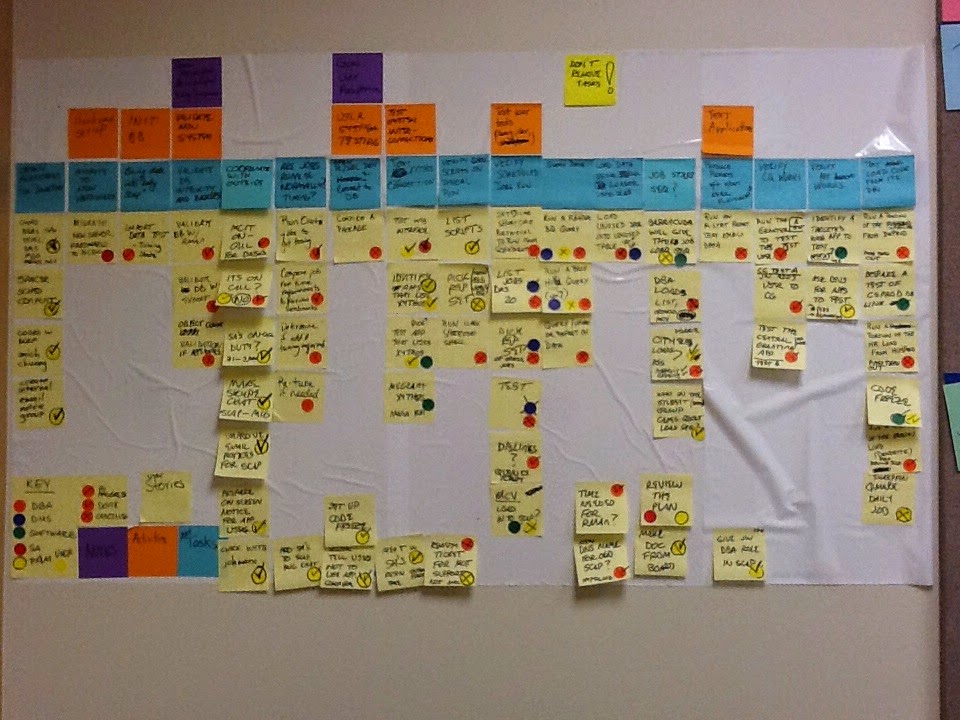
The product application manager on the DBA team disclosed that there was an outage where a data loss occurred over a year ago which initiated a project to upgrade the hardware for this database's server. The project, which was expected to take 3 to 4 months, had stalled and been in-progress for a year. The status of the project was unknown, including what work had been done. It was a high priority for this migration to happen because another outage could happen at anytime and it was predicted that the data loss would be more significant.

The interim manager agreed this project was top priority for the DBA team and I was ready to help get a project plan in place with a "User Story Map" to get it moving along. The exercise was straightforward enough and the group seemed to understand when I walked them through how we would build it despite their not participating in previous story mapping sessions.

However trying to build a story map with a DBA, product application manager, data analyst, software developer  and no product owner yielded what I will refer to as a technical work map. Which for the project at hand made sense and they felt what developed was useful. Basically in the technical work map user activities were developer activities and user stories were developer stories or tasks. Colored dots were placed on the stories to show responsibility and coordination for the DBA's, PAM, data analysts and software development. Marks would be placed in the dots to identify if a story was in progress, done, or cancelled.

Continue reading this BlogSpot at http://curiousagility.blogspot.com/2014/11/getting-it-done-with-technical-work-map.html

 
Follow me on Twitter @_AprilJefferon

Wednesday, October 29, 2014

Organizational Change with Transparency and Inclusion

The deputy CIO heard about my session on removing blame and requested that I facilitate the session with the management team. During the session I had the management team surface blame that existed in the organization. The responses were grouped and through dot voting we prioritized what should be focused on. They then got into small groups and worked on perfecting an idea for change on the highest-ranked topics. The session was well received. The group wanted more time to create action plans to implement the ideas, but we ran out of scheduled time and the deputy CIO wanted to share the results of the employee satisfaction survey.

The survey results showed that scores for one area was very high and another very low, most enjoyed their teams but management was failing at communication and many would leave for just a little more compensation. The next steps were for managers to share the results with their staff and find out more so action plans for improvement could be made. I subsequently asked how would this be done to foster safety? The deputy CIO then requested I partner with her to do this.

My recommendation was for me to facilitate workshops since I was not a part of leadership for each survey group. The workshops would exclude anyone who has a direct report but we would have a separate session for managers. The workshop would be designed to share what we learned from the surveys, get insight on what concerned employees, and identify what change employees wanted to see.
 

Continue reading this BlogSpot at http://curiousagility.blogspot.com/2014/10/organization-change-with-transparency.html


Follow me on Twitter @_AprilJefferon

Tuesday, October 28, 2014

Winds of Change - Part 3: A Fanatic's View of BPM

by Tom Bellinson

Let me just start this post by confessing that I am passionate about business process management (BPM) and its potential for positive change.  I'm going to try to keep this post relatively brief because it would be very easy for me to go "the other way."

The ultimate challenge with BPM tends to start with definitions.  What is BPM?  Ask five experts and you could easily get five different answers.  Chances are, they would all have some things in common.  Let's start with those.
  • Business process management begins with using flowcharts (usually using Business Process Mapping Notation, or BPMN, diagrams) to document "as-is" processes
  • The goal of BPM is process improvement
  • BPM attempts to understand the connections between different business processes
  • BPM requires ongoing involvement from key process stakeholders and works best when there is a continually engaged process owner for each process
After this, lots of other ideas start to come and go from the discussion.  There is also confusion around even the items above.  For example, some people think that if you map processes, you are automatically doing BPM.  I disagree.

As I mentioned in Part #1, like lean, BPM is both a philosophy and a toolkit.  BPMN is part of the BPM toolkit.  Business process management systems (BPMS) software is also part of the BPM toolkit.  The BPMS software vendors have clouded the field by attempting to imply that their solutions ARE BPM.  Poppycock!  

BPM is first and foremost a philosophy.  The philosophy suggests that when the people involved in an organization each know which processes they participate in and the goals of each process, they are better equipped to identify activities that either don't contribute to or take them further away from those goals.

We are all expected to look at our work with a critical eye towards improvement.  BPM gives people a common language for evaluating work and communicating about what they see with others.  If you are familiar with domain driven design (DDD), then you have heard of "ubiquitous language."  The idea is to have a common set of terms that have come to have common meaning among participants.  This creates a degree of transparency about what everyone is doing and why they are doing it which is hard to recreate any other way.

Optimizing processes is an effort requiring both art and science.  It also requires lots of stakeholder engagement. Once a process is properly diagrammed, there will often be some "low-hanging fruit" or obvious changes that will improve the process.  The diagram enclosed was provided by Accenture and does a good job of illustrating some of the trade-off pairs process designers must make.

 It is often the case that substantial gains require some automation.  I always encourage stakeholders to start by using the tools they know (like spreadsheets and word processing software) to "simulate" as best they can the type of electronic solution they think they will ultimately need. 

Starting out with a low tech approach provides invaluable learning about the new way of doing things that will assist in finding the best permanent solution.  The key point here is that BPM is not an initiative that starts and ends.  It may have a beginning, but it should be an endless journey.  The environment in which we work is ever-changing and we must learn to adapt.  As we do this, we need a methodology to systematically reevaluate how we meet the goals of each process.  BPM is a great way to do this.

More about how lean and BPM make good bedfellows in the fourth and final installment of...THE WINDS OF CHANGE! 

Monday, October 20, 2014

Jim Knox, A Caring Legacy


Jim Knox was a friend and employee when I was in charge of Campus Computing Sites. He was an easygoing soul who didn't seem the least bit annoyed to be reporting to some undergraduate kid he'd met umpteen years before. Jim's university work focused on two major areas: the User Advocate team and Adaptive Technology.

Through his User Advocate work, Jim had to deal with computer law that was just developing and with law enforcement that wasn't always tech savvy. He got to deal with hackers and their victims, cyberstalkers and their victims, and with record companies and their victims. As a User Advocate, Jim helped develop the principles and procedures that we use in these matters to this day.

However, Jim's true calling and his true genius was his work in Adaptive Technology. He worked tirelessly on behalf of those with disabilities to improve their use of the University¹s technology resources. In this age of tight budgets and uncertain futures, we often become utilitarian. The needs of the many are more important, as we know, than the needs of the few or of the one. Jim Knox didn't believe that for a second. He strongly believed in the value of the one — each and every one. Jim felt that it was incumbent upon us to buy or craft a piece of hardware, furniture, or software that better molded the machine to the needs of the user with disabilities. Helping someone to overcome obstacles in their use of campus technology was his priority. Jim researched new adaptive technologies and developed some of his own when there wasn't anything available. The disability community had no greater advocate and friend than Jim Knox.

After his untimely death in 2010, Jim's family endowed a fund to both name the Adaptive Technology Computing Site after Jim (its founder and first director) and to provide the financial wherewithal to help provide technology assistance to those in need.

One of my last efforts in Campus Computing Sites was to work with the University Library, ITS, the new Knox Center director, and others to move the Knox Center to a much improved space in the Shapiro Library. Finally, after much effort, that has come to pass. I will be attending the rededication of the Knox Center this Thursday afternoon. It is an honor to recognize a friend and to recommit to his most worthy legacy.

If you are of the philanthropic bent, the James Edward Knox Memorial Fund Endowment (731168) is one of the funds that you can contribute to through the Office of Development (giving.umich.edu). I hope you will consider making it a part of your giving plans.

A Good Change

Winds of Change


Kaizen, or Japanese for "a good change" is the Lean concept of continual improvement at all levels.  This week, I wanted to share with you a story of one small change the Service Desk made that had a big impact on our customers.

Earlier this week, I took a call from one of our customers who was unhappy about our response time on an urgent issue.  As it turns out, he called us and utilized the option in our phone system to leave a message.  We didn't return his phone call in the same day.  Had he stayed on the line until an agent was available we could have solved his issue right away, but he didn't have the time to wait.

The reason why we didn't call him back that same day has to do with how voicemails are handled in our workflow.  Voicemails are automatically transcribed to text and create a ticket in ZenDesk.  Once a voicemail becomes a ticket, it is handled by a different role (with a different workflow) than a phone call.  That workflow has a slower response to issues than our phone workflow.

This feedback from a customer exposed a flaw in our workflows.  From a customer's standpoint, phone calls and email have different priorities.  When you send an email, you don't expect an immediate response, but when you call someone, you expect someone to pick up the other end (and if not, an opportunity to leave a message and have someone call you back shortly).  

Our workflow wasn't purposely designed to handle voicemail this way.  It just emerged from the existing system.   Fortunately making a slight change to improve the response time to voicemails was very easy.  We expanded the role definition for the Service Desk Defender role and changed its workflow to handle voicemails before emailed-in tickets.  Two days later we tested it out and now all voicemails are returned within a few hours. 

Because we deliberately developed the roles and workflows in use by the Service Desk, this was an easy change.  Updating the documentation, communicating the change, and a small configuration adjustment in ZenDesk was all it took.  Had we not done the work of defining workflows, I'm not sure how we could have made this change.  Would we encourage people to look out for voicemails and handle them as a priority?  Yell at staff when they fail to return voicemails in a timely manner?  Neither of these are fail-proof, and as a manager, not the best way to motivate your staff.


Remember, the foundation of the Lean House is Standard Work, Heijunka, and Kaizen.  Can you see how we leveraged Standard Work to make a good change?

Thursday, October 16, 2014

Solutioneering: Innovation and getting it done another way


It is easy for so many of us to solve an incident with a canned default answer of : The only thing we can do is rebuild your machine, I'll put in a ticket, or No we do not support that.  Many IT shops focus nearly exclusively on standard work and static problem solving responses that it is easy to lose sight of why we are here.

Listen, I get it... there is value in having standards and service catalogs and policies but it is a red herring to chase these things exclusively. No doubt we need consistency and standard work where it makes sense for the School but we need to reserve the possibility for the innovative solutions that often make all the difference for our faculty and staff. Innovation is one of our MSIS Values that we would all be wise to pay attention.

Case in point and kudos for the group of device support agents that franken-putered a solution for one of our faculty. Scott Bolak, JD Jordan and Kenny Hill worked together to restore a critical lab based server that was the very definition of non standard hardware. They cobbled together bits and pieces, found the creative solution and got the job done. One shops trash is anothers treasure.


It is one example of the work that makes MSIS different. It is the practice of not starting our work from a position of "No we cant do that" and instead working to find a way if it can at all be found. So much of what makes MSIS different is that we are not trying to engineer out innovation from our services and support for the sake of standards. We can tout it in our vision statements but the real difference is in the everyday efforts that are all too often invisible to the organization. This is the work that the faculty remember and help build trusting partnerships. Good work and keep going.

New Position Posted- Security Analyst


Someone has to be the bearer of bad news.


At the last resource management group meeting a new Security Analyst position in MSIS was approved. The job posting is currently live and can be viewed at umjobs.org. Jonathan Mills, Lead Security Analyst, will be leading the hiring and the interview process for the position. If you, or someone that you know, is interested in Security Incidence Response, or IT Security general, please consider getting in touch to learn more about the position.

Wednesday, October 15, 2014

Winds of Change - Part 2: Lean Thinking

-- By Tom Bellinson

In the last (ahem!) exciting episode of Winds of Change, I offered an overview and brief history of lean.  This time, let's take a somewhat deeper dive.  If you are familiar with the Agile Manifesto,  then you already know some things about lean, because it is essentially lean for software development.

When people use "lean" as a noun, it is often misunderstood.  Like "agile" as a noun, people tend to add far more constraints to the philosophy than is actually there.  Many in the lean community prefer to think of it as both a philosophy and a toolkit.  The philosophy guides operational thinking and the toolkit provides some specific techniques for executing.

Let's start with the philosophy.  First and foremost, lean is a never-ending journey.  As a consultant, I have occasionally come across firms that told me "we tried lean, but it didn't work for us."  As a lean enthusiast, this sounds to me like, "we tried being good at our jobs, but it just wasn't working out."  As Yoda would say, "do or do not -- there is no try."

When an organization begins a lean journey, they commit to driving out waste, or muda as it is referred to in Japanese.  There are seven types of waste.  Although scientists recently claimed discovery of the elusive "8th waste," it has never been verified.  The included diagram will itemize each for you and I'm guessing you will understand what they mean.

The way waste is driven out of processes is through an "improvement event."  This is commonly referred to as Kaizen.  There are many ways to identify a Kaizen opportunity.  One of the principle ways comes from a core part of the lean philosophy, which mandates that decisions be pushed down in the organization to the person or group closest to the affected process.  In other words, if the problem is with scheduling, the scheduling coordinator should own the Kaizen event.

Six Sigma is a different toolbox that is often associated with lean.  It was developed at General Electric and attempts to provide some more mathematical and scientific rigor to the Kaizen process.  The name itself refers to the number of defects per million that a process could produce in order for it to be considered optimized.

In the manufacturing world, where these disciplines were invented, variability is something that is uniformly driven out of good processes.  The reason that the agile manifesto doesn't speak of waste is because creativity can often be a wasteful effort when considered intrinsically.  However, when one looks at the potential benefits produced by the sometimes meandering creative process, it becomes clear that the benefits can far outweigh the cost.

What agile shares with lean is the focus on people.  Both place ultimate importance on the customer, but agree that leveraging staff by empowering people with flexibility, learning opportunities, decision-making authority, and good management leads to more oars in the waters of continuous improvement.

Whole books have been written on lean and this is not an attempt to cover the territory.  However, if all you know about lean is what you've just read, you may be better off than some "experts" who try to pigeonhole the philosophy into their own mold.  In part 3, we'll take apart business process management (BPM) to see if there's anything good under the hood.

Tuesday, October 14, 2014

Service Tip: Checking on related requests

- A PIM tip by Michael Warden

In our last review of our Code Blues we had an interesting item come up.  A user was frustrated when they received our automatic notification from Zendesk that their request was resolved. Apparently, there was another open ticket and they were anxious to hear from us.  Not getting an update when at the same time getting a satisfaction survey created a disappointed customer.  


This was an interesting case - it’s something that is preventable, as anyone in MSIS can see all active requests in Zendesk.  It’s not part of our standard work to check on other open requests, though, so we thought that might be worth considering.  Before we dive in, though, is this a problem that has shown up elsewhere or was this a one time occurrence?


To check this, we looked back over all of the Code Blues since June 1 - the last three months.  In there, we found the following when looking to see if there were other open tickets that created confusion or a less than perfect customer experience:


Month
Code Blues
Related to Multiple Tickets
Percentage
June 2014
20
3
15%
July 2014
21
0
0%
August 2014
15
4
27%
September 2014 (partial data)
4
1
25%
Total
60
8
13%


So, a little more than 1 in every 10 Code Blues had another ticket open at the time.  This isn’t enough for us to change everything we do, but we thought it would help to show the data and open up the discussion across the organization.  


Some possible countermeasures:

  1. Use Zendesk to check if there are other open tickets
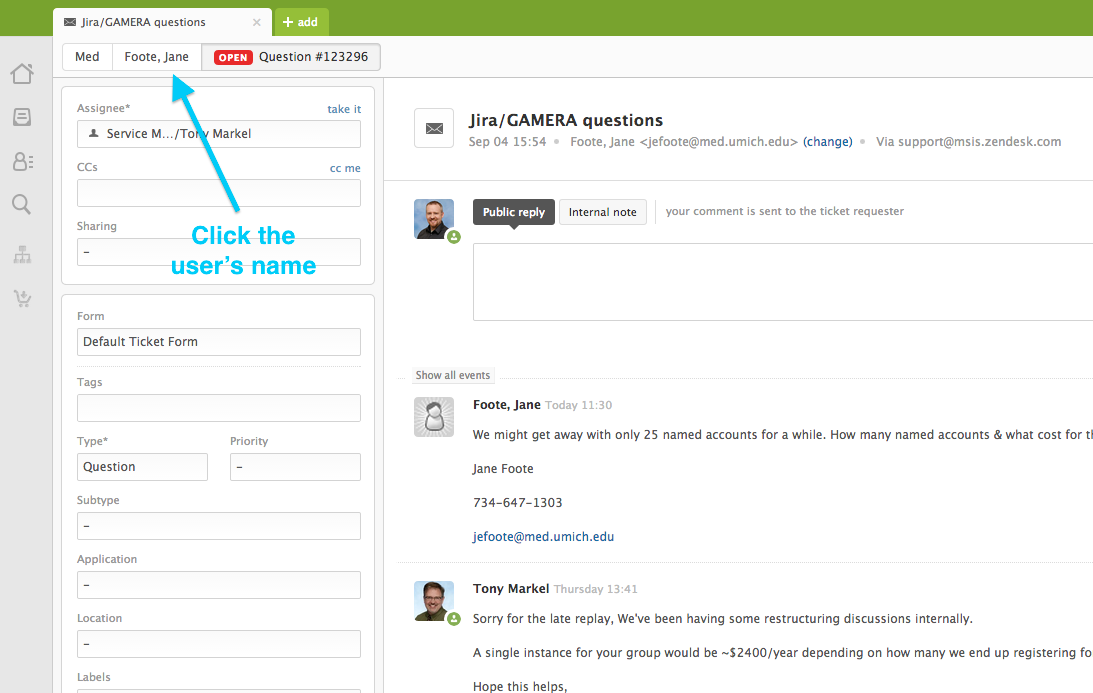
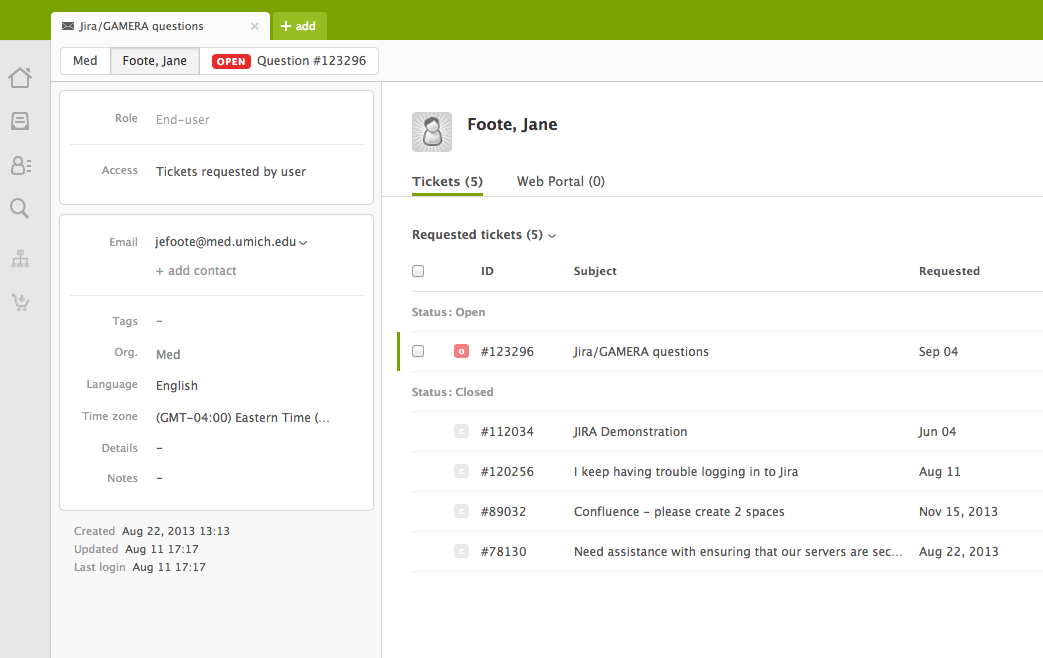
It’s very easy to use Zendesk - through one click - to see if there is anything else open.  All you have to do is click on the user’s name in the upper left side of the screen and you will see all other tickets associated with them.


Screen Shot 2014-09-30 at 1.51.35 PM.png


  1. Ask them if there is anything else they are waiting to hear from us on
This is a natural way to wrap up the conversation, with phrases like “Is there anything else MSIS is working on I can help you with?” or “Is there anything I can check on progress for you?”.  This may often result in a ‘no, that’s all today’ but it opens the chance for helping them on these tickets.


  1. Include a reference to other requests in your confirmation of resolution
When we ask customers if they are all set, remind them they can mention any other active requests.  


Through these little things, we can hopefully see better customer experiences and a better relationship with all of their service needs.


Hope this helps!

Michael